Cards give every project its own named key, a monthly spend cap, and a whitelisted model group. Set one up in four steps.
Click each step to see exactly what happens in the UI.
Sign in with Phantom, Solify, or any Solana wallet. No email required.
Open the card creation modal from your dashboard.
Give it a name, set a monthly SOL limit, pick which model groups it can reach, and pick a color.
Your card's API key is OpenAI-compatible. One line of code and you're live.
Connect any Solana wallet. Your keys, your funds. Yoosh never holds your SOL — your balance lives on-chain and is deducted per token batch.
Phantom      — Most popular, browser + mobile
Solflare     — Hardware wallet support
Backpack     — xNFT-native
Any wallet   — with WalletConnect standard
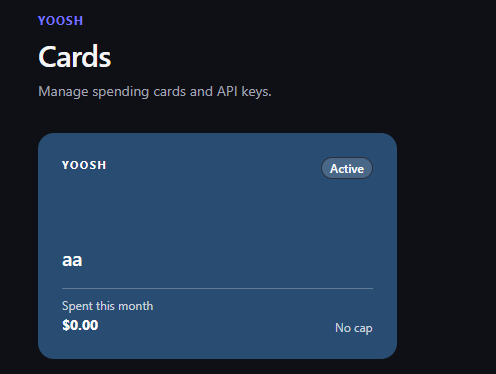
Your dashboard lists all active cards with their spend-this-month and cap. Click "New card" (top right) to open the creation modal.
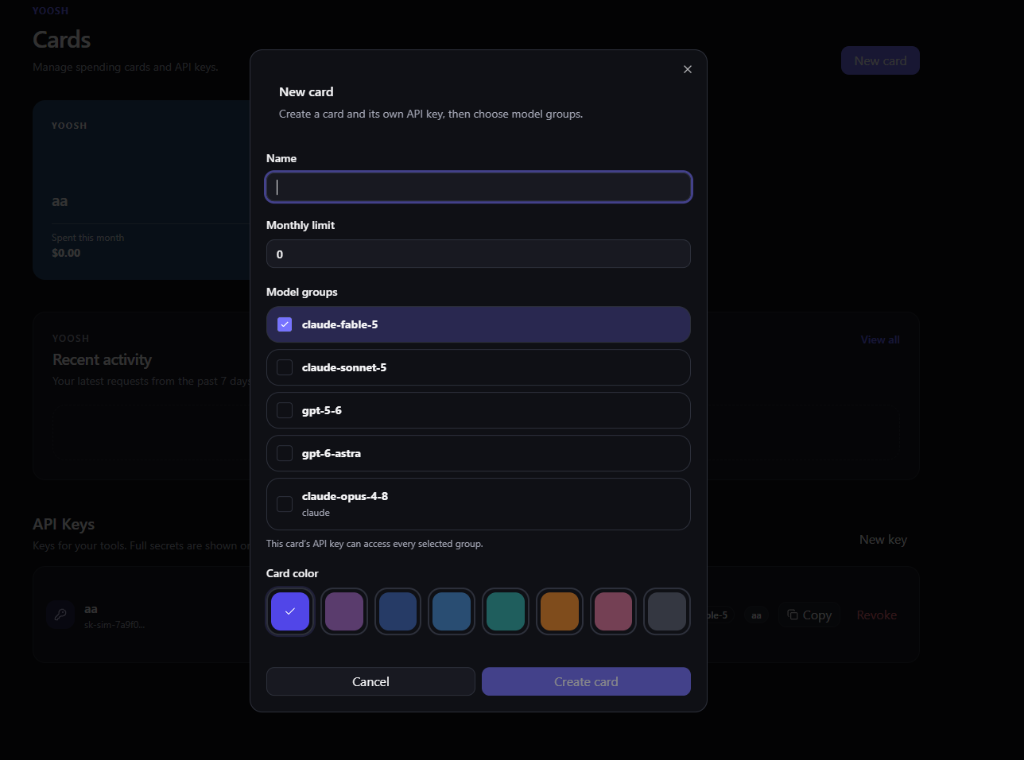
Name — e.g. gpt-production.
Monthly limit in SOL (0 = no cap).
Model groups — whitelist which models this card can reach.
Color — so you can visually distinguish cards at a glance.
Copy the card's key from your dashboard. Change your base_url. You're routing through Yoosh.
from openai import OpenAI

client = OpenAI(
    api_key  = "yoosh-sk-your-card-key",
    base_url = "https://api.yooshrouter.com/v1",  ← only change needed
)

response = client.chat.completions.create(
    model    = "claude-sonnet-4-5",
    messages = [{ "role": "user", "content": "Hello" }],
)
import { createOpenAI } from '@ai-sdk/openai';

const yoosh = createOpenAI({
  apiKey:  'yoosh-sk-your-card-key',
  baseURL: 'https://api.yooshrouter.com/v1',  ← only change needed
});

const model = yoosh('claude-sonnet-4-5');
Click "New card" to walk through the creation flow.
Connect your wallet. Your first Card takes under a minute.
Connect Wallet